There are a couple of issues that the applicant can experience when transferring from the My Information - physiciansapply.ca transfers section of CaRMS Online. Thankfully, with Jennifer Barbier's knowledge of this process, she was able to provide us with multiple steps to troubleshoot this type of issue.
Error - 2
Here are the troubleshooting steps for this error code, which can also be copy/pasted for an email and edited as necessary:
- Please clear your cache. For further instructions on how to clear your cache, click this link: How do I clear my cache?
- Close all of your browsers.
- Our application does not support mobile browsers, please ensure you open a new window directly from your pc.
- Only have 1 tab of CaRMS online opened
- Do not use a bookmark, please type carms.ca in your browser.
- Log in as per usual.
- Click on "My Information" and select "physicianapply.ca transfers".
- You will be redirected to the CaRMS-PA portal.
- Log in as per usual.
- Proceed with the transfer as usual
Sometimes, on an Apple computer, the applicant could be using AppleWebKit (which can be found in COAT at the following section:

Based on Jennifer Barbier's knowledge, she was able to figure out that this can cause issues as it can prevent some functionality in Chrome as it can be seen as mobile usage. If you find that the applicant is using this, ask the applicant to use one of the following browsers:
- Edge
- Firefox
- Brave
If they are using a workstation with Windows OS, any browser should work.
If this fails, ask the applicant to unshare their information (MCC exam results, etc) during the transfer process and try it again.
If the transfer is once again unsuccessful, request their PA username for testing purposes.
The sharing process was unsuccessful
Here is a photo of this error:
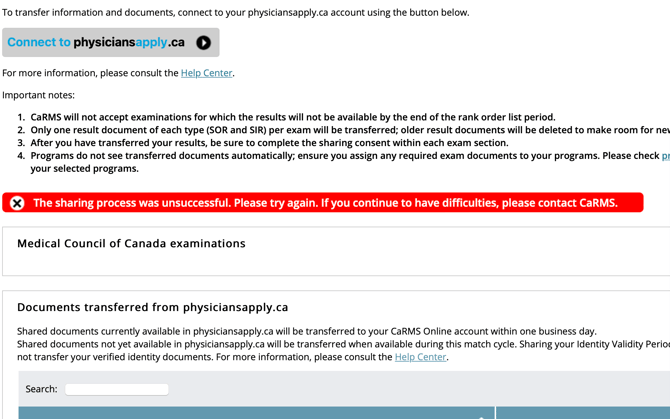
This can commonly happen when the applicant is attempting to share their IVP, but have already uploaded and assigned their own citizenship document.
If an applicant is experiencing this issue, check to see if they have uploaded and assigned any citizenship document prior to this transfer. If they have, request them to unassign the document from ALL applications.
They can then proceed with the transfer again, and it should work.